
Emacs in the Cloud
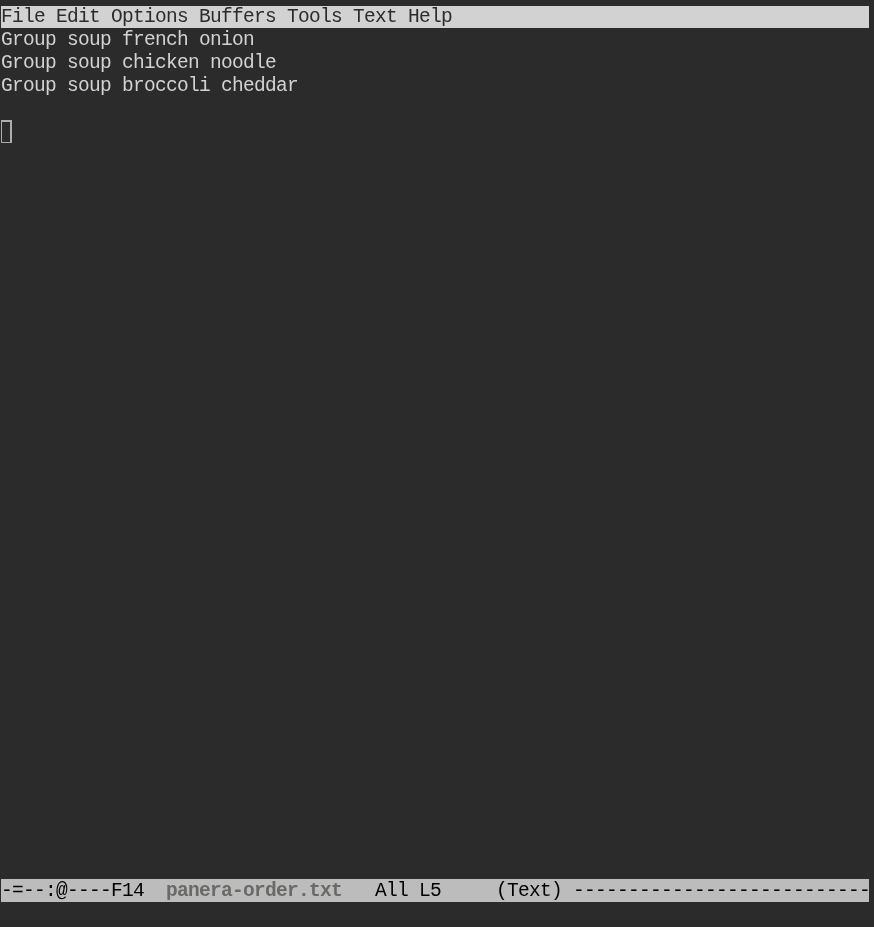
Example buffer in the browser.
As of late, I’ve migrated a lot of my home network notes and such into a single emacs session running in Docker. While it’s quite powerful, it lacks the location-agnosticism convenience of keeping them in the cloud in some way.
So I set out to fix that. What follows is a (built heavily in consultation with Gemini) configuration for running an emacs session behind an in-browser terminal with 2-factor authentication, all as a family of Docker containers. We’ll go over each part one at a time. The key technologies used in this stack are:
- emacs (of course)
- ttyd (TTY endpoint in the browser)
- authelia (managing authentication and session tokens)
- nginx (proxy to the emacs container and authelia
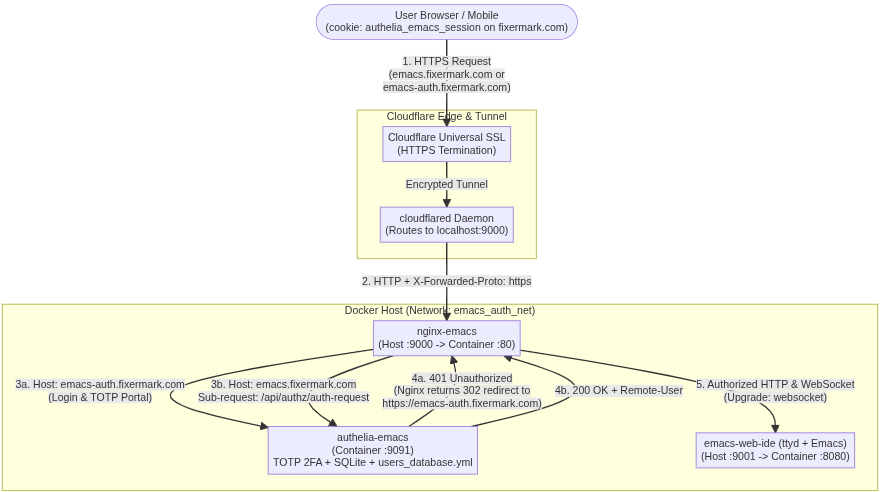
Components of the architecture.
The core container: emacs and ttyd.
The core application is an emacs daemon running in a docker container with ttyd. Each invocation of ttyd launches emacsclient.
FROM debian:bookworm-slim

# Install Emacs (no-X11 version) and minimal dependencies
RUN apt-get update && apt-get install -y \
    emacs-nox \
    curl \
    ca-certificates \
    && rm -rf /var/lib/apt/lists/*

# Download the latest stable pre-compiled ttyd binary
# (Using x86_64 architecture - adjust to aarch64 if building on Apple Silicon M-chips)
RUN curl -Lo /usr/local/bin/ttyd https://github.com/tsl0922/ttyd/releases/download/1.7.7/ttyd.x86_64 \
    && chmod +x /usr/local/bin/ttyd

# Create a non-root user matching typical host UID/GID (1000) for clean file permissions
RUN groupadd -g 1000 developer && \
    useradd -u 1000 -g developer -m -s /bin/bash developer

# Setup our editing workspace
RUN mkdir -p /workspace && chown -R developer:developer /workspace
WORKDIR /workspace

# Copy and configure the entrypoint script
COPY entrypoint.sh /usr/local/bin/entrypoint.sh
RUN chmod +x /usr/local/bin/entrypoint.sh

# Switch to the non-root user
USER developer

EXPOSE 8080

ENTRYPOINT ["/usr/local/bin/entrypoint.sh"]
And the entrypoint.sh script:
#!/bin/bash
set -e

echo "Starting Emacs background daemon..."
emacs --daemon

# Wait for the Emacs server socket to become available
echo "Waiting for Emacs server socket to initialize..."
while [ ! -S /tmp/emacs1000/server ] && [ ! -S /run/user/1000/emacs/server ]; do
    # Check fallback standard location if XDG_RUNTIME_DIR isn't strict
    if emacsclient -a false -e 't' >/dev/null 2>&1; then
        break
    fi
    sleep 0.5
done

echo "Emacs daemon is ready!"
echo "Launching ttyd web terminal on port 8080..."

# Execute ttyd. Running via 'exec' makes it PID 1 so it handles OS signals correctly.
exec ttyd --writable -p 8080 emacsclient -nw /workspace
Conveniently, ttyd launches one instance of emacsclient per browser window, so I get multi-window access to my emacs client for free.
The components
With that container in place, here is the docker-compose.yml file to stand up the architecture.
services:
  nginx-emacs:
    image: nginx:alpine
    container_name: nginx-emacs
    restart: unless-stopped
    ports:
      - "9000:80"
    volumes:
      - ./service-configs/nginx/conf.d:/etc/nginx/conf.d:ro
    networks:
      - emacs_auth_net
    depends_on:
      - authelia-emacs
      - emacs-web-ide

  authelia-emacs:
    image: authelia/authelia:latest
    container_name: authelia-emacs
    restart: unless-stopped
    volumes:
      - ./service-configs/authelia/config:/config
    environment:
      - TZ=America/New_York
    networks:
      - emacs_auth_net

  emacs-web-ide:
    build: .
    container_name: emacs_web_terminal
    ports:
      - "9001:8080"
    volumes:
      # Maps a local folder named 'project_files' to Emacs' working directory
      - ./project_files:/workspace
      # Optional: Mount a local init file or directory if you have an existing config
      # - ~/.emacs.d:/home/developer/.emacs.d
    environment:
      - TERM=xterm-256color
    restart: unless-stopped
    networks:
      - emacs_auth_net

networks:
  emacs_auth_net:
    driver: bridge
The emacs / ttyd container we’ve already talked about; let’s talk about the configuration of the other pieces.
nginx
Here is the config for nginx at service-configs/nginx/conf.d/default.conf
# 1. Authelia Login Portal
server {
    listen 80;
    server_name emacs-auth.fixermark.com;

    location / {
        proxy_pass http://authelia-emacs:9091;
        proxy_set_header Host $host;
        proxy_set_header X-Real-IP $http_cf_connecting_ip;
        proxy_set_header X-Forwarded-For $proxy_add_x_forwarded_for;
        proxy_set_header X-Forwarded-Proto https;
        proxy_set_header X-Forwarded-Host $http_host;
        proxy_set_header X-Forwarded-Uri $request_uri;
    }
}

# 2. Protected ttyd + Emacs Instance
server {
    listen 80;
    server_name emacs.fixermark.com;

    # Internal endpoint for Authelia verification
    location /internal/authelia/authz {
        internal;
        proxy_pass http://authelia-emacs:9091/api/authz/auth-request;

        proxy_set_header X-Original-Method $request_method;
        proxy_set_header X-Original-URL https://$http_host$request_uri;
        proxy_set_header X-Forwarded-For $http_cf_connecting_ip;
        proxy_set_header Content-Length "";
        proxy_pass_request_body off;
    }

    # Main ttyd + Emacs route
    location / {
        auth_request /internal/authelia/authz;

        auth_request_set $user $upstream_http_remote_user;
        auth_request_set $groups $upstream_http_remote_groups;
        proxy_set_header Remote-User $user;
        proxy_set_header Remote-Groups $groups;

        error_page 401 =302 https://emacs-auth.fixermark.com;

        # Proxy to ttyd on container port 8080
        proxy_pass http://emacs-web-ide:8080;

        proxy_set_header Host $host;
        proxy_set_header X-Real-IP $http_cf_connecting_ip;
        proxy_set_header X-Forwarded-For $proxy_add_x_forwarded_for;
        proxy_set_header X-Forwarded-Proto https;

        # Required for ttyd WebSocket connections
        proxy_http_version 1.1;
        proxy_set_header Upgrade $http_upgrade;
        proxy_set_header Connection "upgrade";
        proxy_read_timeout 86400;
    }
}
This has configured two servers behind the proxy: my ttyd server and an authelia server, selectd by the domain name we are accessing through. I’m using Cloudflare to provide a tunnel to my server, and it serves one “application” at each endpoint.
Q: Don’t you know that means Cloudflare could see all traffic to your server unencrypted?
A: Yes. ;)
There are a couple interesting pieces worth noting here:
- Authelia is being vended behind the emacs-auth domain and also the emacs.fixermark.com/internal/authelia/authz path (internal only, nginx can route that to itself but won’t do special handling for it coming from outside).
- The
auth_requeststanza in the Emacs routing logic makes nginx consultauthelia-emacs:9091/api/authz/auth-requestbefore vending the emacs server, and a 401 from Authelia will cause a 302 redirect into the auth endpoint. Otherwise,
This is the glue that allows Authelia to sit “in front” of the emacs server by having nginx consult Authelia for confirmation requests are valid before letting them through.
Authelia configuration
Authelia requires setting up a few magic keys and a user account. We’ll start
with the service configuration, at service-configs/authelia/config/configuration.yml:
theme: dark

server:
  address: 'tcp://0.0.0.0:9091'

log:
  level: info

totp:
  disable: false
  issuer: emacs.fixermark.com
  period: 30
  skew: 1

webauthn:
  disable: true

identity_validation:
  reset_password:
    jwt_secret: 'key1'

authentication_backend:
  file:
    path: /config/users_database.yml
    password:
      algorithm: argon2
      argon2:
        variant: argon2id
        iterations: 3
        memory: 65536
        parallelism: 4
        key_length: 32
        salt_length: 16

access_control:
  default_policy: deny
  rules:
    - domain: emacs.fixermark.com
      policy: two_factor

session:
  secret: 'key2'
  expiration: 1h
  inactivity: 15m
  remember_me: 1M
  cookies:
    - name: authelia_emacs_session
      domain: fixermark.com
      authelia_url: https://emacs-auth.fixermark.com
      default_redirection_url: https://emacs.fixermark.com

regulation:
  max_retries: 3
  find_time: 2m
  ban_time: 5m

storage:
  encryption_key: 'key3'
  local:
    path: /config/db.sqlite3

notifier:
  disable_startup_check: false
  filesystem:
    filename: /config/notification.txt
The placeholders key1, key2, and key3 above are secrets that need to be
set up (they can be generated with openssl rand -hex 32).
I then need a pre-specified user. This goes in the file
service-configs/authelia/config/users_database.yml:
users:
  fixermark:
    displayname: "Mark Tomczak"
    password: "PASSWORD"
    email: fixermark@gmail.com
    groups:
      - admins
The PASSWORD is a placeholder for a password hash that we can generate
out-of-band with Authelia:
docker run --rm authelia/authelia:latest authelia crypto hash generate argon2 --password 'YOUR_NEW_PASSWORD'
First login with Authelia
With these pieces set up, there is one more bit of out-of-band to handle on
first login: I have turned on one-time passwords (that I load into Google
Authenticate). The first time I try to add a device, a confirmation code will be
needed that is actually put in
service-configs/authelia/config/notification.txt. I’ll have to get the code
from there to paste into the Authelia UI.
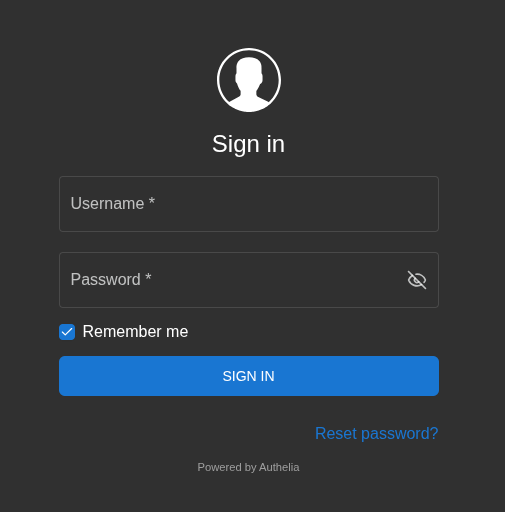
With all these pieces set up, it is now possible to login via Authelia to reach my emacs session from anywhere on the web.

Potential improvements
Connection stability
Timeouts are a bit sloppy; when the session breaks, you end up in an infinite
loop of “Hit return to reload” prompts from ttyd. This is adjustable in the
configuration.yml for Authelia. Note: I have not tried these configurations yet.
session:
  secret: '<secret>'
  expiration: 12h       # Standard login lasts 12 hours (or e.g., 7d for 7 days)
  inactivity: 0         # Disables idle timeout so sleeping your computer won't log you out
  remember_me: 1M       # Checking "Remember me" keeps you logged in for 1 month
Mobile support
As it stands, ttyd strictly works on Chrome / Android but doesn’t *work-*work. The default Android keyboard is ill-suited to emacs and its reliance on alt, meta, control, and arrow keys.
The easiest solution I found was to install Unexpected keyboard directly on my Android device. It gives me all the fancy input features I want to make emacs palatable. I may try in the future hacking some quick-tap macros into the ttyd UI so that common operations are easier to execute.
Comments