
DPS Bot
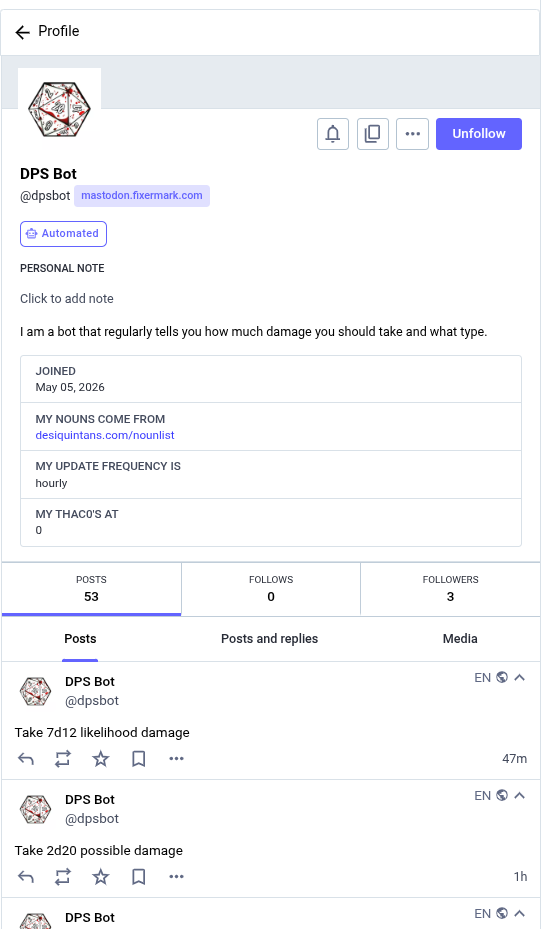
So I decided to build a bot in Mastodon that reports the damage you’re taking hourly.

This was a fun exercise and mostly an excuse to play with Rust. I’ll talk about the process a bit: the core, setting up the scripts to execute it, and then a Docker wrapper.
The core
The core program is a pretty simple Rust app I’ve published
here. It’s main part is short
enough to replicate here. It basically takes in a \n-separated list of nouns,
finds the line breaks, selects a random one, and outputs “Take XdY Z damage”,
where X is a random number between 1 and 8, Y is a die size between 4 and 100,
and Z is one of the random nouns.
use std::fs;
use std::error::Error;
use std::env;
use rand::random_range;
use rand::seq::IndexedRandom;

fn get_word_boundaries(all_words: &String) -> Vec<usize> {
    let mut word_boundaries = Vec::with_capacity(10_000);
    word_boundaries.push(0);

    for (i, c) in all_words.char_indices() {
        if c == '\n' {
            word_boundaries.push(i+1);
        }
    }

    word_boundaries
}

fn main() -> Result<(), Box<dyn Error>> {

    let file_path = env::args().nth(1).unwrap_or("singular-nouns.txt".to_string());
    let all_words: String = fs::read_to_string(file_path)?;


    let word_boundaries : Vec<usize> = get_word_boundaries(&all_words);

    let word_index = random_range(0..word_boundaries.len() - 2);

    let count_dice = random_range(1..9);

    let sides = [4,6,8,10,12,20,100].choose(&mut rand::rng()).unwrap();


    let word = &all_words[word_boundaries[word_index]..(word_boundaries[word_index + 1] - 1)];

    println!("Take {}d{} {} damage", count_dice, sides, word);

    return Ok(());
}
A small bug
I had to hunt down a small bug in the initial implementation: instead of
iterating on char_indices(), I tried to use enumerate(). This gives numbers
indicating the nth character in the string. It turns out when you slice a
string, it’s byte-wise, not character-wise; the presence of an extended Unicode
character in the input file can throw the entire slice off (and panic if you try
to use the slice and it’s not a valid UTF-8 string). char_indices() gives the
byte offsets of the characters instead.
Creating a bot account
Generating an account that operates as a bot on a Mastodon node is remarkably simple: it’s a regular account with two properties:
- By convention, it has the “This is an automated account” option set under the user’s “Public profile” preferences. This indicates to others that the account is automated, probably won’t respond to messages, etc.
- Generate an App to act as the automation bridge. In Preferences, go to
< > Development, select “New application,” set an application name (no application website needed), and give it the scopes it needs (write was required here). The redirect URI should be left as the defaulturn:ietf:wg:oauth:2.0:oob.- Once the application is created, write down its Client key, Client secret, and access token.
The bot itself
The bot itself consists of a few scripts, a Docker container for convenience, and a cron job on the Raspberry Pi hosting it.
Posting is remarkably easy; there is a
handy command-line tool just for
posting. The provides directions for downloading a binary from an APT
repository; I downloaded it and then copied it into a staging directory. Next to
that file is singular-nouns.txt, my project GitHub repo at dps-bot-textgen
that I’ve run cargo build --release on, and one shell script, post.sh:
#!/bin/sh
#
# WARNING: slightly bad form here; these keys should be more secure

export MASTODON_SERVER=https://mastodon.fixermark.com
export MASTODON_CLIENT_ID="Client key"
export MASTODON_CLIENT_SECRET="Client secret"
export MASTODON_ACCESS_TOKEN="Access token"

TEXT="$(./dps-bot-textgen)"
./mastodon-post -text "${TEXT}"
As noted, baking the auth codes into the script isn’t best practice, but it
makes the Docker part simpler. Those environment variables are looked for by
mastodon-post.
Last ingredient is a Dockerfile to bundle all the bits as an image. A little overkill, but simplifies keeping things organized.
FROM debian:bullseye-slim

# Update and install CA certs, or mastodon-post can't talk to server
RUN apt-get update && \
    apt-get install -y ca-certificates && \
    rm -rf /var/lib/apt/lists/*

WORKDIR /app
COPY mastodon-post ./
COPY singular-nouns.txt ./
COPY post.sh ./
# Ideally, we should be able to compute this path
COPY dps-bot-textgen/target/release/dps-bot-textgen ./

CMD ["./post.sh"]
I build out the Docker image with docker build -t dps-bot .
That’s it! Running that Docker image in a container will post once and tear down. Only remaining part is a cron entry to do it:
3 * * * * /usr/bin/docker run --rm dps-bot
Comments